
What seamless actually means on a printed surface, four ways to make a repeating tile, and how to check the joins before you send a file to print.
A seamless pattern is a tile whose opposite edges continue into each other: what leaves the right side comes back on the left at the same height, and top matches bottom. When that rule holds, one square file prints across any surface — yards of fabric, a roll of wallpaper, a whole bedding set — with no visible boundary between repeats.
Most "how to make patterns seamless" advice stops at making the edges meet. For print that is only half the job: the tile also has to survive production, where real print shops will place it side by side at exact size. This guide covers what seamless means, four ways to get there, and the check that saves a print run.
Open any fabric marketplace and every listing assumes the file repeats without seams. The promise has two parts:
The second part is where most attempts fail — not at the edge itself, but at what the edge treatment does to the whole repeat.
In Illustrator or Photoshop you can set up a repeat template: draw the motif, move copies across each edge by exactly the artboard's width and height, and anything that crosses an edge is duplicated on the opposite side. This is the highest-quality route and the slowest. It is how professional repeat artists work, and it gives full control over where motifs sit in the repeat.
The famous recipe: flatten the image, apply Filter → Other → Offset with wrap-around, which pushes the edges into the middle, then retouch the seams that now show in the center of the canvas. Cheap and universal.
Flip the image horizontally and vertically into a 2×2 grid and every internal edge meets its mirror twin. Edges join perfectly — but the repeat is now made of symmetric quarters. Stripes zigzag, text flips backwards, faces appear in pairs. On a printed surface the kaleidoscope effect is obvious within a few repeats.

The newest route: keep the pattern exactly as drawn and have a model rebuild only the strip where each edge meets its opposite. The motif keeps its direction and shape; the join is re-painted so opposite edges continue. This is what our Pattern Generator does — you upload a flat layout, pick which edges to join (all four, left-right, or top-bottom), set the seam width, and it outputs a tile at 1K, 2K, or 4K.
The fastest way to see the difference is to put both on one wall:
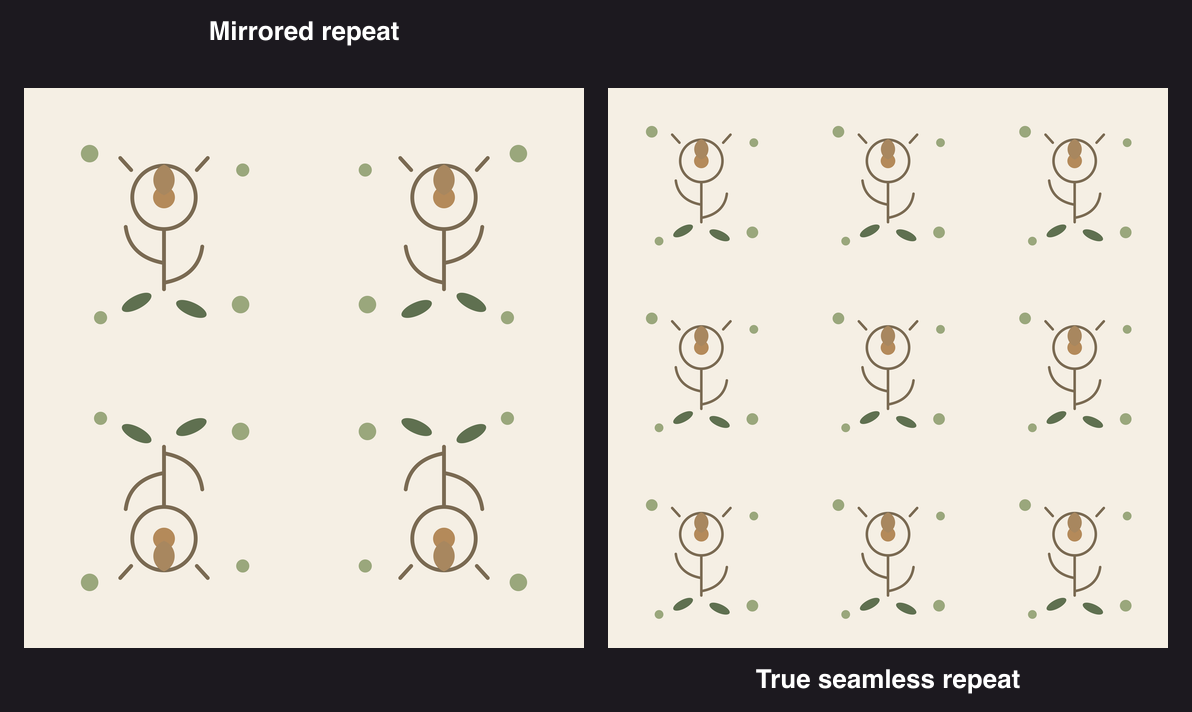
Same motif, same tile size. On the left, half the flowers hang upside down and the leaves flip with them — the kind of thing a customer photographs and posts in a review. On the right, every repeat faces up: this is what a production file must look like.
Whichever route you take, never judge a tile at tile size. Place at least a 3×3 repeat on a large canvas and zoom into the boundaries between repeats — that is where a broken join actually shows:

Look for:
Our free Pattern Checker does exactly this: upload the tile, it fills a large canvas with the repeat, and you pan and zoom the joins. It runs in your browser and nothing is uploaded.
A seamless tile is not yet a print file. Before sending anything to a shop, you also need the physical size right: a 2048 px tile at 300 DPI prints 17.3 cm — fine for a fat quarter, small for wallpaper. The DPI number itself is just a label; what matters is pixels per printed inch.
If the tile is too small for the run length, two tools on this site cover the gap:
Technically the edges meet, so tile-selling sites may accept it. In production, buyers and printers consider mirrored repeats a defect for anything directional. If the pattern will print on fabric or wallpaper, use a true repeat.
Yes, if the texture is roughly uniform (concrete, sand, knit). Offset the edges and retouch, or use seam joining. Faces, logos and distinct objects in a photo will not repeat believably.
Three routes, depending on the image. Abstract texture: offset the edges in an editor and retouch the seam. Any flat layout where the motif matters: seam joining — upload it to a tool like Pattern Generator, pick the edges, and the joins are redrawn. Directionless texture only: mirror it, accepting symmetric repeats.
Illustrator and Photoshop give full manual control (repeat templates and offset filters). Procreate and Canva are popular for hand-drawn patterns — Canva needs the offset trick since it has no dedicated repeat tool. If you have a finished flat layout, an online seam-joining tool is the fastest path and runs the same on any device, including iPhone or iPad.
Yes — repeating patterns are a standard product on fabric and POD marketplaces, and sellers typically list the same tile across many colorways. What buyers and printers reject is a mirrored "seamless" file: check the repeat before listing (see below) so a review does not catch it first.
For print-on-demand fabric, marketplaces commonly ask for 300 DPI files; a 150 DPI file prints acceptably on posters and décor. Work backwards: printed size in inches × 300 = pixels needed per side.
Straight-across repeats put every motif at the same offset in every row. Use a half-drop layout (offset every second row by half the tile height) or let the join treatment vary the strip.
Tile it at least 3×3 on a large canvas and zoom the inner boundaries — not the tile edges themselves. The Pattern Checker sets this up in one drop.
A pattern you draw or derive from your own artwork is yours. Mirrored or offset edits of someone else's artwork do not make it yours — the underlying motif is still theirs.
No. Illustrator is one route, and the tutorial ecosystem around it is large, but the same result comes from Photoshop's offset filter, Procreate on iPad, or seam joining in the browser. The repeat check at the end matters more than the tool you draw in.
Drawing the repeat yourself gives the best result and costs the most time. Mirroring is instant and fine for abstract texture, but it prints as symmetric units. Seam joining sits in between: the artwork stays as drawn and the joins are rebuilt — Pattern Generator does it in about a minute, and Pattern Checker verifies the result for free before anything goes to a print shop.