

Every common tablecloth size for 6ft, 8ft, round and highboy tables, the drop math behind them, and the pixel dimensions each cloth needs at 150 and 300 DPI.
A tablecloth size chart usually answers half the question. It tells you a 6-foot banquet table wants a 90 × 132 inch cloth for a floor-length drop, and stops there. If you are the one printing the cloth, the question that decides whether the job works is the next one: how many pixels does a 90 × 132 inch file need?
This chart answers both halves. Standard cloth sizes in inches and centimetres first, then the pixel dimensions each one needs at the DPI fabric actually prints at, and what to do when your image is nowhere close.
The rule behind every row: cloth size = table size + 2 × drop (one drop per side). Three drop conventions cover almost every event:
| Table | Table size | Lap drop (15″) | Floor drop (30″) |
|---|---|---|---|
| 6 ft banquet | 30″ × 72″ | 60″ × 102″ | 90″ × 132″ |
| 8 ft banquet | 30″ × 96″ | 60″ × 126″ | 90″ × 156″ |
| 60″ round | 60″ diameter | 90″ round | 120″ round |
| 72″ round | 72″ diameter | 102″ round | 132″ round |
| Highboy cocktail (42″ tall) | 30″ diameter | 60″ round (16″ drop) | 120″ round |
In centimetres, the floor-length sizes run: 6 ft table → 229 × 335 cm cloth, 8 ft → 229 × 396 cm, 60″ round → 305 cm round, 72″ round → 335 cm round, highboy → 305 cm round.
Fabric printing runs at a fixed resolution, and for cotton, polyester and print-on-demand cloth that number is usually 150 DPI (300 DPI for premium small runs and fine line work). Pixels needed = inches × DPI. Here is the floor-length column again, in pixels:
| Cloth (floor length) | cm | Pixels at 150 DPI | Pixels at 300 DPI |
|---|---|---|---|
| 90″ × 132″ | 229 × 335 | 13,500 × 19,800 | 27,000 × 39,600 |
| 90″ × 156″ | 229 × 396 | 13,500 × 23,400 | 27,000 × 46,800 |
| 120″ round | 305 ⌀ | 18,000 × 18,000 | 36,000 × 36,000 |
| 132″ round | 335 ⌀ | 19,800 × 19,800 | 39,600 × 39,600 |
| 120″ round (highboy) | 305 ⌀ | 18,000 × 18,000 | 36,000 × 36,000 |
And if you only need the lap drop, the 6 ft numbers are 60″ × 102″ → 9,000 × 15,300 px at 150 DPI.
Run the lap-drop row for a 6 ft table against any camera: a 12 MP phone photo is about 4,000 × 3,000 px, which covers a 26 × 20 inch area at 150 DPI. The floor-length cloth wants 267 MP. Nobody has that photograph. This is normal: every printed tablecloth you have ever seen started from a file smaller than the cloth and was rebuilt or upscaled first.
Not sure which drop your event needs? Venues and rental companies almost always spec it per table; when nobody specs it, 15 inches is the safe default for seated dinners and 30 inches for display or trade-show tables.
That whole decision turns into three clicks in the workbench: pick a sample or your own file, pick the shape, set the exact target size.
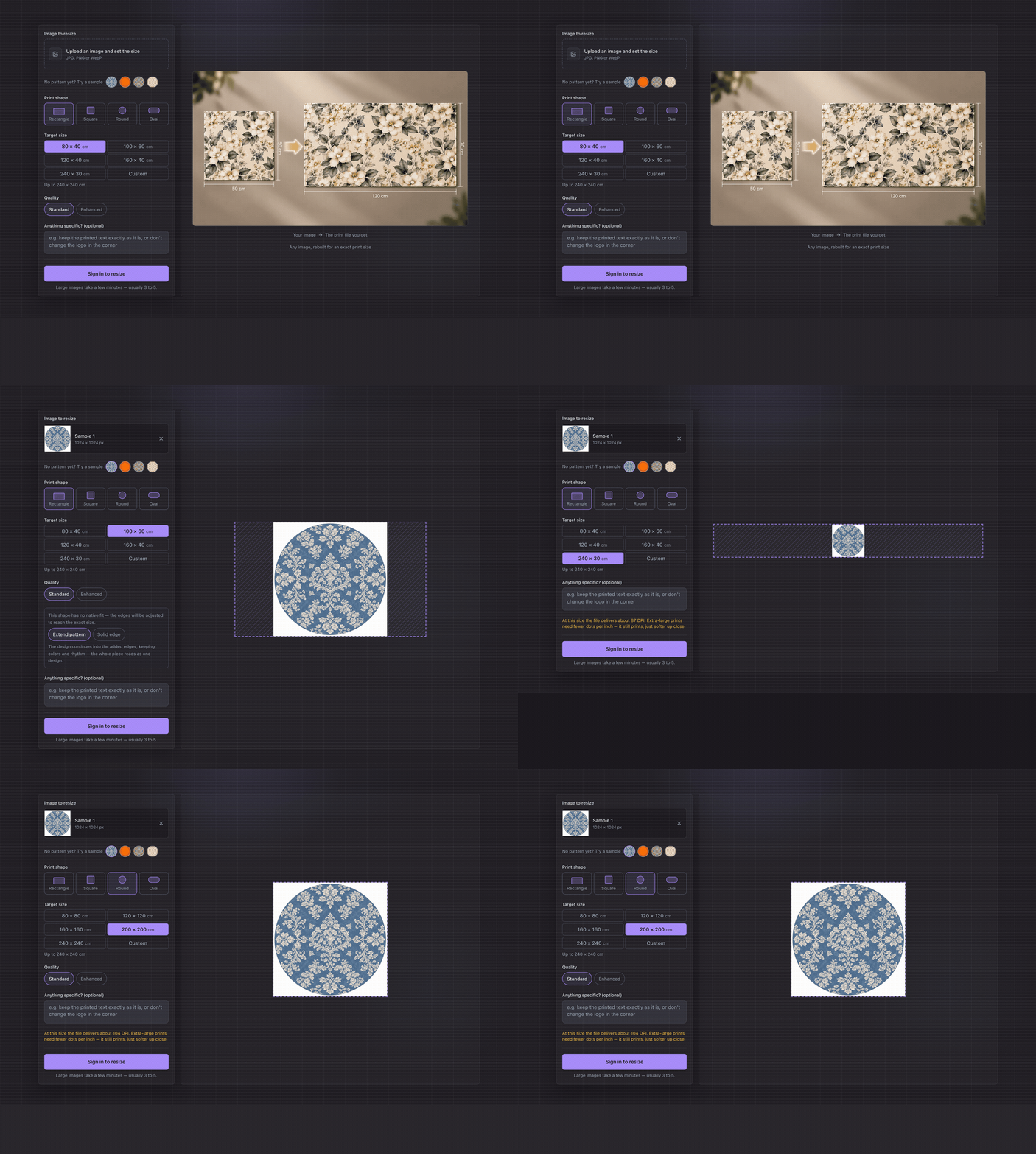
Three fixes, in the order we recommend:
What never works: relabelling the DPI tag to 150. The tag describes pixels; it does not create them. If that distinction is new, why a 300 DPI image still prints blurry breaks it down.
60″ × 102″ for a 15 inch lap drop, 90″ × 132″ for floor length. In centimetres: 152 × 259 or 229 × 335.
60″ × 126″ lap (152 × 320 cm) or 90″ × 156″ floor (229 × 396 cm).
Cloth size in inches × 150 DPI for standard fabric. A 6 ft floor-length cloth is 13,500 × 19,800 px; the lap version is 9,000 × 15,300. The Print Size Calculator converts any row of this chart for you.
150 DPI is the working standard for fabric and POD cloth; 300 DPI for premium runs and small text or fine line work. Above 300 buys nothing on fabric; the weave is the ceiling.
Not at its native size. A 1024 × 1024 generation covers roughly 6.8 inches at 150 DPI. It needs upscaling or a rebuild first. Upscale an image for printing explains the math and the fixes.
Pick your row, type the size into Print Resize, and the file comes back at exactly that cloth size with the DPI written in. The free checks tell you what you are starting from before any credits are spent.
Further reading Fabric Print File Preparation — Exact Size, DPI and Repeats · How to Create Seamless Patterns for Print · How to Increase the DPI of an Image (Without Ruining the Print) · Why Your 300 DPI Image Still Prints Blurry
Recommended tool
Resize an image for printing at any size from 10 to 240 cm. Print Resize rebuilds the image for that exact size, and the credit cost is shown before it runs.
Open Print ResizeAuthor
PrintResize Team
We build PrintResize and test every workflow in these guides on real print files.
More Posts
The complete prep list for fabric printing: exact-scale setup, the pixels every repeat size needs at 150 and 300 DPI, the Spoonflower specifics, and the seamless check to run before you upload.
What seamless actually means on a printed surface, four ways to make a repeating tile, and how to check the joins before you send a file to print.
Changing DPI is a one-minute fix once you know which of two problems you have: a missing tag, or missing pixels. Both fixes, step by step, with free tools.
The DPI number in your file is just a label. What decides sharpness is how many pixels you have per printed inch. Here is how to check the real number and fix a file that falls short.
A 1024 px AI image is ~14 DPI on a 6-foot tablecloth. The effective-DPI math for any image, what upscaling actually adds, and the fix workflow.